Published: April 23, 2026
Auto Stringing
Stop burning 20 minutes per quote working out string configurations by hand. Solar Proof now generates a valid, balanced, MPPT-aware string layout in seconds — temperature-corrected and ready to send.
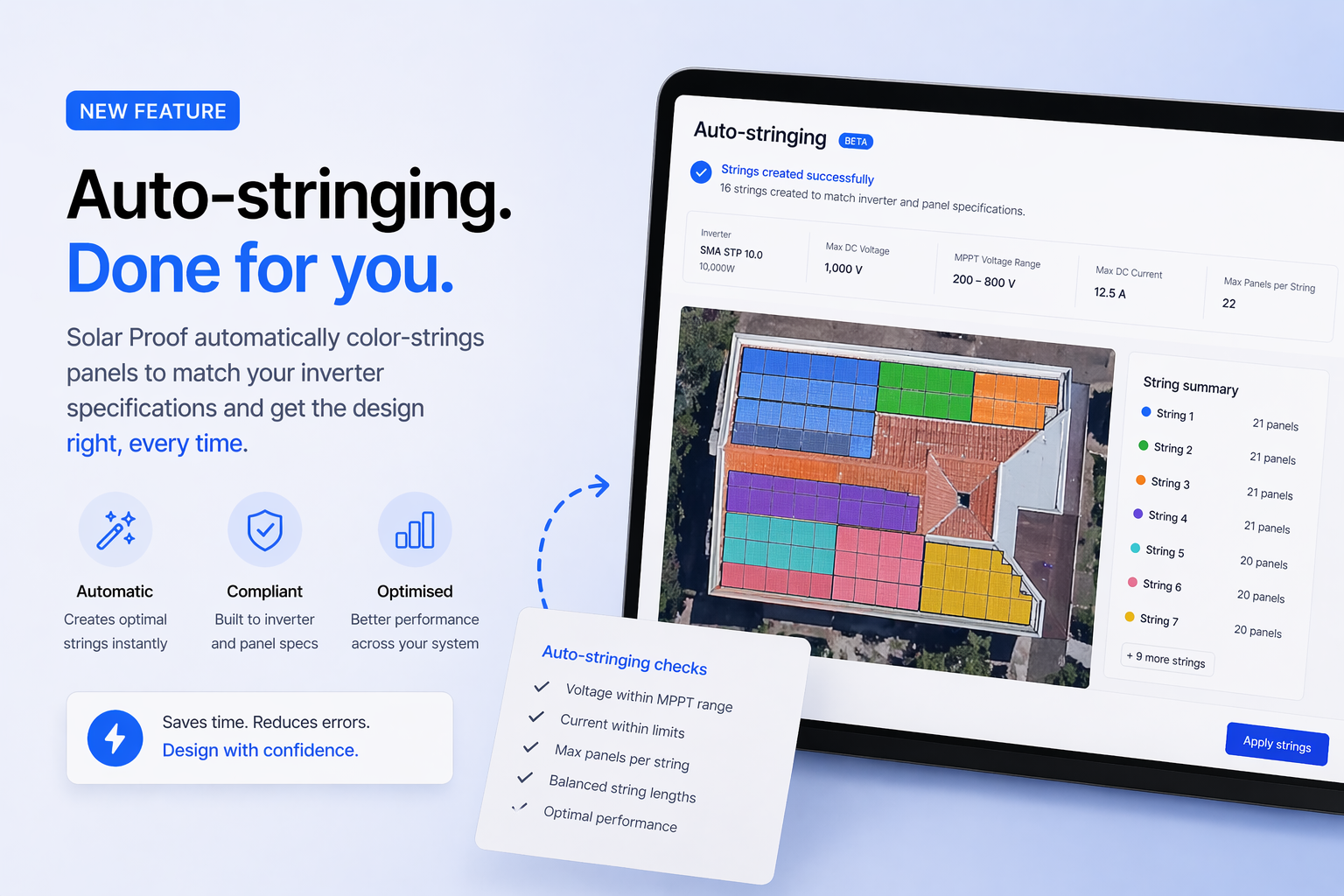
Compliant string configurations in one click
Manual stringing is one of the most time-consuming and error-prone parts of solar design. You're juggling MPPT voltage windows, current limits, temperature-corrected Voc, and balancing panels evenly across trackers — all before you can send a quote. Auto Stringing takes the whole job off your plate. Here's what it does and why it matters:
- What is Auto Stringing?
- How does it work?
- Why accurate string design matters
- How to use Auto Stringing in Solar Proof
Article Contents
What is Auto Stringing?
Auto Stringing is a feature in Solar Proof that generates a valid string configuration for your solar design automatically. Pick your panel and inverter, click once, and Solar Proof returns a compliant, balanced layout — panels per string, strings per MPPT — that respects every manufacturer specification.
It replaces one of the most fiddly steps in the design process: working out how to distribute panels across an inverter's MPPT inputs without breaching voltage windows, current limits, or temperature-extreme Voc ratings.
Most designers either reach for a spreadsheet, rely on memorised rules of thumb, or accept whatever default the inverter manufacturer suggests. All three approaches cost time and leave room for error — errors that only show up at install when an inverter won't start, or at compliance when an inspector flags an over-voltage risk.
How Does Auto Stringing Work?
When you trigger Auto Stringing, Solar Proof pulls the full spec sheet for your chosen panel and inverter, along with the project's location data, and runs the configuration against every relevant electrical constraint. The engine checks:
- MPPT voltage windows — minimum voltage at high operating temperature (so the inverter actually turns on) and maximum voltage at cold-start conditions
- Temperature-corrected Voc — calculated using project location data rather than generic defaults, so cold-morning open-circuit voltage stays in spec
- Max input current per MPPT channel — including parallel string current where multiple strings share a tracker
- String balance across multiple MPPTs — panels distributed evenly so no tracker is starved or overloaded
- Panel-inverter compatibility — flags mismatches before the configuration is ever sent to a customer
The result is a starting configuration you can use as-is or override manually. Safety margins are shown alongside each string so you can see exactly why the config is valid — no black box.
Why Accurate String Design Matters
String design isn't a detail you can leave for the installer to figure out on the roof. A poorly strung system creates real, expensive problems:
- Inverter won't start — strings too short mean string voltage drops below the MPPT minimum on hot days, and the inverter sits idle
- Over-voltage damage — strings too long can exceed maximum Voc at cold-start, risking inverter damage and voiding warranty
- Failed compliance — an inspector who spots an over-voltage risk will fail the install, and you're back on site to rewire
- Wasted generation — unbalanced strings across MPPTs mean one tracker is limiting output for the whole inverter
On top of the technical risk, manual stringing is slow. Fifteen to twenty minutes per quote adds up fast across a busy sales team — and that's for a single straightforward design. Throw in multi-MPPT hybrid inverters or split-orientation arrays and the time blows out further.
The most common stringing mistake: Using generic -10°C Voc margins instead of location-specific temperature data. Auto Stringing uses the project's actual climate zone so your config is compliant for the site, not a national average.
How to Use Auto Stringing in Solar Proof
Auto Stringing is built directly into the Solar Proof designer — no separate tool, no export/import. Here's the workflow:
- Open a project and add your panel layout and inverter selection as normal
- Click Auto String in the design interface
- Solar Proof runs the configuration against manufacturer specs and project location data
- Review the suggested layout, with safety margins shown for each string
- Accept the config, or override any string/MPPT assignment manually
The whole process takes seconds. Because it lives inside the designer, the string configuration flows straight through to your proposal, single-line diagram, and installer pack — with no re-entry.
For best results, make sure your inverter's MPPT data is complete in the Solar Proof library (voltage range, max input current per tracker, number of MPPTs). If you're using an inverter you've added yourself, double-check those fields before running Auto String.
Summary
Auto Stringing removes one of the biggest time sinks — and one of the most common error sources — from the solar design process. By generating a valid, balanced, temperature-corrected string configuration in seconds, it frees up your sales team to spend their time selling rather than checking voltage arithmetic.
If you're still stringing by hand or using a separate spreadsheet, try Auto Stringing on your next design and see how much time it saves you — and how much more defensible your proposals become.
Start a free trial of Solar Proof and try Auto Stringing today.

Chris Taeni - BEngg (Power)
Solar Proof Solutions Pty Ltd
Director