Published: April 9, 2026
Solar Installer Portal
Stop coordinating jobs over the phone. Give your installers a dedicated login so they can see their scheduled jobs, access job details, and update progress — all without touching your admin account.
For solar retailers managing multiple installation crews, job coordination is one of the biggest operational headaches. Details get lost in text messages, installers turn up without the right information, and admin staff spend hours fielding calls that should be unnecessary. The Solar Proof installer portal is designed to fix this. Here's what we'll cover:
- What is the Solar Proof installer portal?
- What can installers see and do?
- How does it reduce admin overhead?
- How to set up installers in Solar Proof
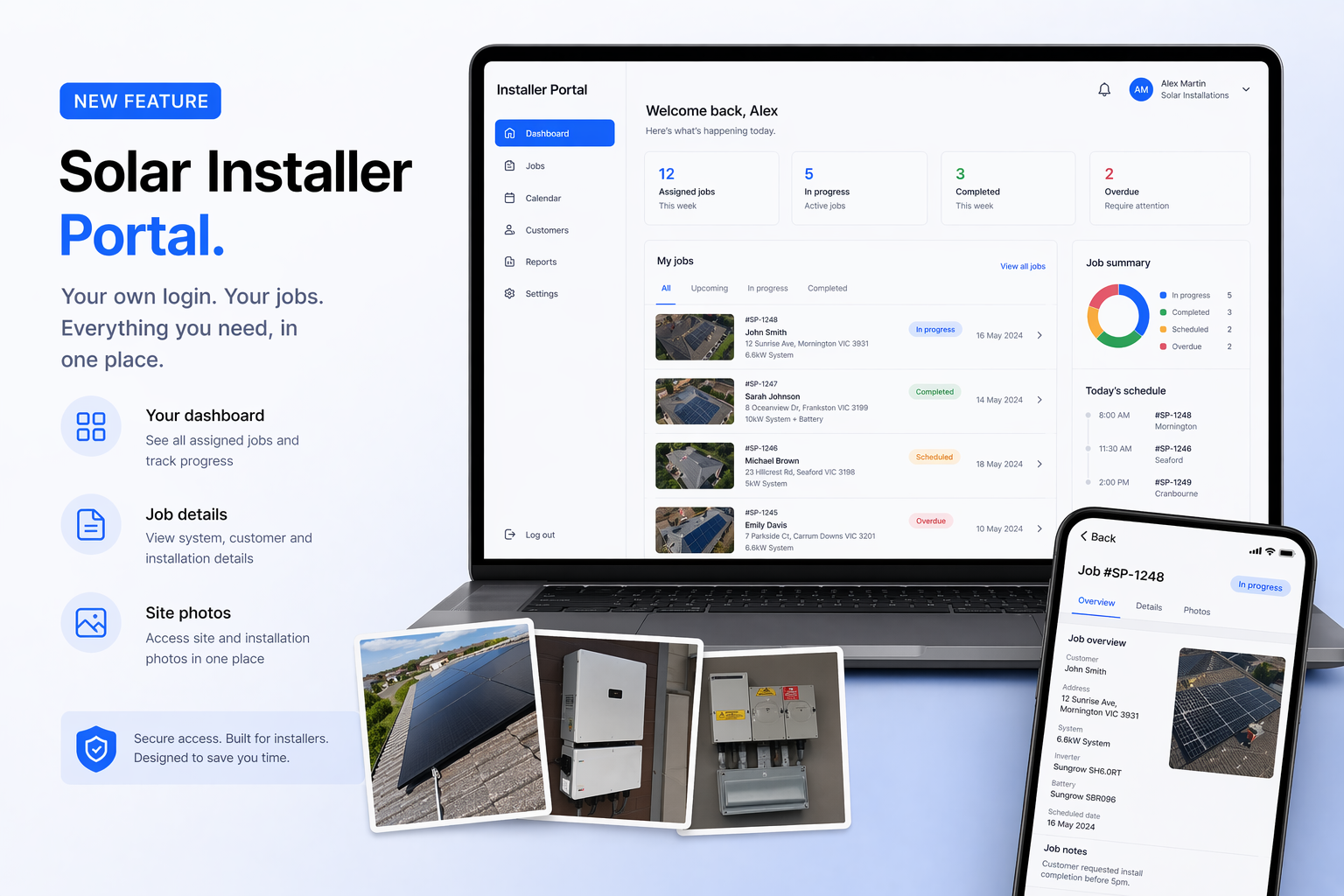
Installer portal dashboard (example)
Article Contents
What is the Solar Proof Installer Portal?
The installer portal is a separate, dedicated login environment within Solar Proof for your installation team. Unlike your main admin account — which contains quotes, customer data, financials, and full project management tools — the installer dashboard is scoped specifically to what an installer needs to do their job.
This means your electricians and installation crews can access their assigned jobs, review the details they need on-site, and update job status — without having visibility of your pricing, margins, customer contact lists, or other sensitive business data.
It's a clean separation of concerns: your sales and admin team manage the business in Solar Proof, and your installers manage the jobs through their own portal.
What Can Installers See and Do?
When an installer logs in to their portal, they see a dashboard of jobs that have been assigned to them. From there they can:
- View job details — site address, system size, equipment specified, installation notes
- Access the jobsheet — the key document covering what's being installed and any special requirements
- See scheduled install dates — so they know what's coming up in their queue
- Update job status — marking jobs as in progress or completed
Critically, installers do not see customer pricing, quote values, retailer margins, or any other commercially sensitive information. Their view is limited to what's operationally relevant to their role.
On mobile: The installer portal is fully mobile-responsive, so your crew can pull up job details on-site from any smartphone — no app download required.
How It Reduces Admin Overhead
The biggest win for most solar businesses isn't the technology itself — it's the reduction in back-and-forth communication. When installers have direct access to the information they need, you eliminate a whole category of interruptions:
- Installers calling the office to ask for an address or confirm what's being installed
- Admin staff manually forwarding job sheets via email or text
- Status updates being communicated verbally and then manually entered into a system
- Miscommunication about what equipment is required for a job
For a business running 5+ installs a week, each of these touchpoints adds up. The installer portal removes most of them by putting the right information directly in the installer's hands — and letting them feed status updates back into the system without admin involvement.
It also creates a cleaner audit trail. When a job is marked complete through the portal, that update is timestamped and recorded in Solar Proof — not sitting in a text thread or WhatsApp group that's impossible to reference later.
How to Set Up Installers in Solar Proof
Adding installers to your Solar Proof account is managed from the admin area. Here's how it works:
- Go to your Team / Installers section in the Solar Proof admin
- Add each installer with their name and email address
- Solar Proof sends them an invitation to set up their portal login
- Once set up, you can assign jobs to individual installers from within any project
- The installer will see that job in their dashboard immediately
There's no limit to the number of installers you can add, and each one gets their own separate login credentials — so you always know who actioned what.
Summary
The Solar Proof installer portal is a practical tool for solar retailers who manage their own installation crews. It removes the friction of manually coordinating jobs, gives installers exactly the information they need without exposing sensitive business data, and creates a cleaner operational record — all from within the same platform you already use for quoting and proposals.
If you're currently coordinating installs via phone, text, or email, the installer portal is worth setting up on your next job.
Try Solar Proof free and set up your installer portal today.

Chris Taeni - BEngg (Power)
Solar Proof Solutions Pty Ltd
Director